Aether Weaver
Multimodal storytelling that keeps text, pictures and sound consistent: a scene graph that remembers the story's world, a controller for its plot, and a mapper that turns moods into words, sounds and visual cues.
If you have played with AI storytelling tools you have probably seen something like this. In the text, the heroine drops her lantern in the river; two pictures later she is holding it again. A character who is terrified on the page is calmly smiling in the illustration. And the soundtrack is vaguely "ominous" whatever is actually going on.
Most of the time the culprit is the pipeline. The usual way to build these systems is a cascade: a language model writes the story, and then separate modules read the finished text and make pictures and sounds for it[2][3]. Each step only sees what the step before it wrote down, and nothing keeps track of the world the story is happening in: who is where, what they are holding, and what state things are in.
Aether Weaver[1] is my attempt at doing this differently. Rather than writing the story first and decorating it afterwards, it generates the text, a structured model of the story's world, the pictures and the sound cues together, one scene at a time, with each piece feeding the others. In this article I want to walk through how it works, using one story from the paper as a running example: Elara, who meets the spirit of an ancient tree called the Elderwood.
The article is split into a few parts. First, an overview of the whole loop. Then one section for each of the three components that do the steering: the Director, which keeps a dynamic scene graph of the story's world; the Narrative Arc Controller, which keeps the plot on track; and the Affective Tone Mapper, which keeps the mood consistent across text, pictures and sound. After that I'll show how characters stay recognisable from picture to picture, what the expert evaluation found, and what I learned along the way. The code snippets are simplified Python sketches of the ideas rather than the production code.
- Overview
- The Dynamic Scene Graph
- The Narrative Arc Controller
- The Affective Tone Mapper
- Keeping Characters Recognisable
- Does It Work?
- Lessons
- What's Next
- Citation
Overview
Here is the set-up. Before a story starts, you give Aether Weaver a premise, optionally some characters and a setting, a narrative arc (a Classic Arc, a Tragedy, a Hero's Journey and so on), one to three moods with an intensity each ("Mystery: High", "Hope: Medium"), and a visual style. Then it writes the story one scene at a time.
How Aether Weaver fits together
One pass of this loop produces one scene: its text, its world state, its picture and its sound cues
You choose
- Story premise
- Characters & setting
- Narrative arc
- Moods & intensities
- Visual style
You get
- Story text
- Editable scene graph
- Scene images
- Soundscape cues
Five components take part in every scene. The Narrative Arc Controller works out where we are in the plot and what this scene should achieve. The Affective Tone Mapper turns the moods into concrete guidance. The Narrator, a large language model, writes the scene along with a list of sound cues. The Director reads what was written and updates its model of the world, or pushes back if something doesn't add up. Finally, the Visual Scene Generator combines all of this into one detailed image prompt and draws the scene.
The key difference from a cascade is the loop between the Narrator and the Director. The Narrator doesn't just get "the story so far": every prompt also carries the current state of the world. Roughly, it is put together like this:
def narrator_prompt(story, arc, tones, graph):
    stage = arc.stage_at(story.progress)
    return "\n\n".join([
        story.user_inputs,                      # premise, characters, setting, style
        "Story so far: " + story.summary,
        f"Stage: {stage.name}. Goal: {stage.goal}",
        "Mood: " + tones.directive(stage),      # from the Affective Tone Mapper
        "Current world state:\n" + graph.describe(),
    ])
Each of those lines comes from a different component, so let's go through them in turn.
The Dynamic Scene Graph
If there is one idea at the centre of Aether Weaver, it is this one. The Director keeps a dynamic scene graph: a structured record of what is true in the story right now, which it updates after every scene. Everything else reads from it: the Narrator's next scene, the picture for this one, and the writer's edits. It is the system's single source of truth about the story's world.
What's in the graph
The graph has three kinds of things. Nodes are the entities in the story: characters, key objects, locations and events. Edges are directed relations between them, such as "Elara IS AT the Elderwood" or "the Forgotten Shrine is INSIDE the Whispering Woods". And attributes hang off both: Elara's mood is "wonder and determination", the Elderwood "has spirit: true", and the shrine "contains relic: true". Formally, it is a directed graph G = (V, E, A) of nodes, edges and attributes.
Here is the actual graph the Director produced after the first scene of Elara's story, node for node and edge for edge from the paper. Entities are circles, their attributes hang off them as small labels, arrows are relations, and the dashed lines link the Spirit Revelation event to the two entities that took part in it:
The scene graph after scene 1, node for node
The Director's actual output for Elara's story, from the paper. Drag a node to move it; hover or tab to one for details.
Show as a list
Scene graphs are a standard way of describing what is in an image in computer vision[4]. What makes this one dynamic is that it describes a world that changes. Characters move, objects break and new people arrive, and the graph has to keep up, scene after scene.
How it changes
After every scene, the Director turns the Narrator's prose into updates. Three steps read the new text side by side, and their findings are merged and then applied:
How the Director updates the graph
This runs after every scene the Narrator writes
Update the scene graph
- Add / remove nodes
- Update edges
- Modify attributes
- Spatial reasoning
- Consistency enforcement
Named entity recognition finds the characters, objects and places in the scene, and any new ones become nodes. Relation extraction works out how they relate: who does what, what is near or inside what, and what caused what. Attribute updates catch changes of state, like the paper's example "The once gleaming artifact was now tarnished". The findings are merged into one list of proposed changes, which is then applied: nodes added or removed, edges updated and attributes modified.
The last two steps are what keep the world honest. Spatial reasoning tracks relative positions (near, inside, on), so that nothing teleports or overlaps without the story saying so. Consistency enforcement runs basic logical checks: if something leaves the story, its relations go with it, and if a character moves, their old location is replaced. And if a proposed change doesn't make sense, the Director doesn't apply it. It raises a flag, or sends a corrective prompt back to the Narrator.
Watching it change
Here is that loop on Elara's story. Step 1 is the graph exactly as the Director produced it after scene 1 in the paper. Steps 2 and 3 are my illustration: two sentences I wrote for this page, and what the Director's rules do with them.
The dynamic scene graph, one update at a time
Step through the story. Hover or tab to a node to see its attributes.
Show the graph as a list
In step 2, Elara walks to the shrine. The Director finds her, the spirit and the shrine (all already in the graph), extracts the move and updates her location: the old IS AT edge goes, a new one points to the Forgotten Shrine, and spatial reasoning notes that she is still inside the Whispering Woods. In step 3, a careless next sentence has her resting under the Elderwood again, with no journey back. A cascade would happily draw her under the tree. The Director catches the teleport instead, leaves the graph as it is, and asks the Narrator to fix the scene.
The core of these rules fits in a few lines:
def apply(graph, changes):
    # Check first: nobody changes place unless the text moves them
    for a, rel, b in changes.new_edges:
        if rel == "IS AT" and graph.location(a) not in (None, b) and not changes.moves(a):
            return flag(f"{a} is at {graph.location(a)}, not {b}")   # back to the Narrator

    for node in changes.removed:
        graph.remove_node(node)                 # its edges go with it
    for a, rel, b in changes.new_edges:
        if rel == "IS AT":
            graph.remove_edges(a, "IS AT")      # nobody can be in two places
        graph.add_edge(a, rel, b)
    for node, key, value in changes.attributes:
        graph.nodes[node][key] = value
    return graph
Who reads the graph
- The Narrator. Every prompt includes the current world state, as in the sketch above, so the next scene starts from the facts rather than from a summary of what happened.
- The Visual Scene Generator. It gets the scene graph along with the text, so the image prompt can say who is in the scene, where they are and in what state, instead of guessing from the prose.
- You. The graph is shown alongside the story and can be edited directly. Edit a scene's text instead, and the Director re-reads it and updates the graph to match, creating profiles for any new characters.
That last point is easy to overlook, but it matters. Because the world state is explicit, a mistake can be fixed once, in the graph, instead of in every scene and picture that follows.
The Narrative Arc Controller
Ask a language model for a story with a beginning, a middle and an end and you'll usually get one. But ask it to keep writing scene after scene and it tends to meander. The Narrative Arc Controller fixes this with something very simple: a state machine. Each arc type (Classic Arc, Tragedy, Hero's Journey, Rags to Riches, Quest and Character Arc) is a sequence of stages, and each stage comes with a goal, some mood cues and a few keywords. Here is the Classic Arc:
The Classic Arc, stage by stage
Drag through the story to see what the Narrative Arc Controller tells the Narrator at each point
Mood cues passed to the Affective Tone Mapper
Keywords
The interesting design choice is when to move from one stage to the next. You could wait for an event ("the climax has happened"), or ask the Narrator whether it thinks the stage is finished. I went with the simplest thing that could work: each stage starts at a fixed fraction of the planned story. With ten planned scenes, the climax arrives about two thirds of the way through, whatever else is going on.
STAGES = [("Exposition", 0.00), ("Rising Action", 0.25), ("Climax", 0.65),
          ("Falling Action", 0.80), ("Resolution", 0.90)]

def stage_at(progress):                         # scenes written / scenes planned
    return [name for name, start in STAGES if progress >= start][-1]
This sounds almost too simple, but it worked well, and it is predictable, which matters when a person is co-writing with the system. The stage's goal goes straight into the Narrator's prompt as a directive, and its mood cues go to the Affective Tone Mapper.
The Affective Tone Mapper
Mood is where text, pictures and sound most easily drift apart. "Mystery" means something to a language model, something else to an image generator, and something else again to whoever (or whatever) picks the sounds. The Affective Tone Mapper bridges this with a small knowledge base: for every mood, how to express it in words, in sound and in pictures, at three intensities.
One mood, three vocabularies
The Affective Tone Mapper's entry for Mystery: evokes intrigue, curiosity, unknown, hidden truths
For the Narrator
- Focus on secrets, puzzles, and hidden truths. Introduce unanswered questions and obscured details.
- Describe enigmatic characters and subtle, confusing clues. Build anticipation without full revelation.
- Use evocative, atmospheric, and suggestive language. Employ fragmented sentences or rhetorical questions.
For the soundscape
Subtle, low-frequency drones; unsettling, barely audible hums. Distant, unresolved musical phrases. Isolated, unidentifiable creaks or whispers.
For the image
Dominant low-key lighting with deep, sprawling shadows. Obscured areas featuring mist, fog, or heavy rain. Frame shots with partially hidden objects or figures. Use slightly off-kilter or Dutch angles.
When the arc and your moods disagree
So for every scene the mapper produces three things: a directive for the Narrator, a list of sound cues and a list of visual cues. The difference shows up in the details. In the evaluation, a character's "growing dread" led Aether Weaver to suggest "low, rising dissonance" and "exaggerated heartbeat sounds", where the baseline offered generic cues like "ominous music".
The mapper also listens to the arc. The current stage always adds its own mood cues, and a strongly negative stage turns your positive moods down a notch, so a story you asked to be joyful doesn't stay cheerful through its darkest moment:
def combine(user_tones, stage):
    tones = list(user_tones)
    # A strongly negative stage turns the user's positive moods down a notch
    if any(t in NEGATIVE and level == "High" for t, level in stage.cues):
        tones = [(t, lower(level) if t in POSITIVE else level) for t, level in tones]
    return tones + stage.cues                   # the stage always adds its own cues
Keeping Characters Recognisable
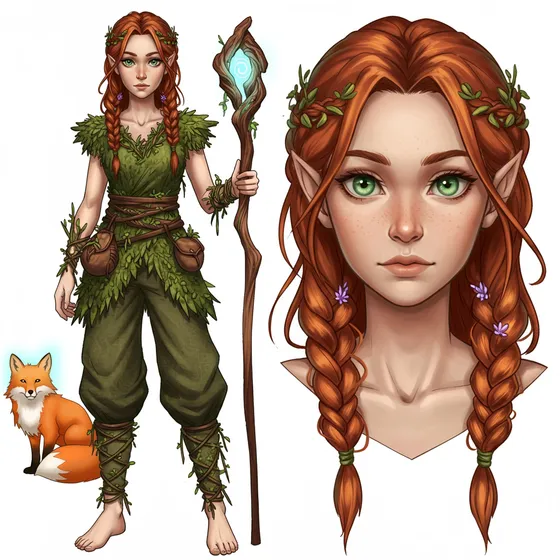
Text is the easy part to keep consistent. Pictures are much harder, because every scene is drawn from scratch by a text-to-image model, and if the prompt just says "Elara" you get a different Elara every time. Aether Weaver tackles this with what the paper calls multimodal character grounding.
Each character starts with a profile: name, description, personality, appearance and clothing. If you upload a portrait, that becomes the reference. If not, the system generates one from the profile, a full-body view and a close-up. Then a vision model looks at that image and writes back a much more detailed description of what the character actually looks like. From then on, whenever the character is in a scene, that description is added to the image prompt.
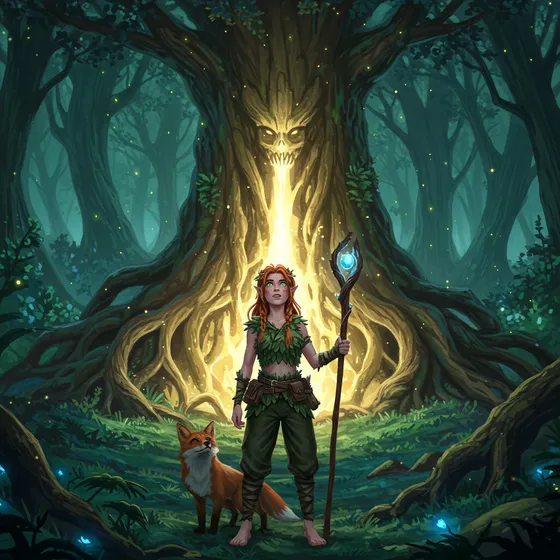
It helps a lot, but it isn't a guarantee: the image model still draws every scene from nothing, so small details can drift. That is one of the limitations I come back to at the end.
The writer also stays in charge of where the story goes. Besides editing scenes and the scene graph, there is a Plot Twist feature: pick one of the twists the model suggests, or write your own, and the Narrator builds the next scene around it, with new visual and sound cues to match.
Does It Work?
To evaluate it, I put together 10 story prompts across genres such as sci-fi and fantasy. Each came with one to three moods at chosen intensities, and a standard arc. The baseline was a cascade similar to Arif et al.[2]: a language model writes the whole story first, then entity extraction feeds a generic image prompt and a simple soundscape description (if the text says "ominous", you get "ominous sounds"). There is no scene graph and no mood control.
A panel of 10 experts (professional writers, game designers, and AI researchers who work on narrative systems) rated the results on a five-point scale:
How experts rated the stories
Mean rating on a 1–5 scale; 10 story prompts per system, rated by a panel of 10 experts
Show as a table
The pattern is what you would hope for, given where each component acts. Fluency barely moves: modern language models already write fluent prose, and both systems used one. The big gaps are in visual coherence (4.23 against 2.85) and affective alignment (4.67 against 3.28), the two things the Director and the mood controls are there for. The experts' notes say the same: the baseline often forgot objects, put characters in inconsistent poses or places, and didn't update the state of things, and its emotional tone was often flat, or shifted without a reason.
I want to be clear about what kind of evaluation this is: a small expert study, reported as average ratings. It tells you that people who know stories found the output clearly better. It doesn't count how often the system still gets things wrong. Measuring that directly, for example by counting continuity errors per thousand words, or by checking whether a story's emotional curve really follows the requested arc, would make a good next experiment.
Lessons
Give the model a world, not just a history
A summary of the story so far tells a language model what happened. It doesn't tell it what is true now. Making the world state explicit, and giving a separate step the job of maintaining it, is the core idea of Aether Weaver, and visual coherence is where the biggest improvement showed up.
A little structure goes a long way
The arc controller is just a list of stages with a threshold each. Simple, predictable rules gave the plots a shape that the experts noticed: arc adherence went from 3.45 to 4.30.
Every medium needs its own vocabulary for a mood
Pass the word "mystery" to three different models and you get three unrelated ideas of mystery. Translating it once, into words, sounds and visual cues, keeps them in step.
Pictures forget faster than words
The text stayed consistent much more easily than the images. Most of the inconsistency that remains comes from drawing each scene from scratch.
Keep the writer in the loop
Making the scene graph readable and editable turns a black box into something a writer can steer, and it means a mistake can be fixed in one place instead of in every scene that follows.
What's Next
There is plenty left to do. These are the main gaps:
- Space. The Director only tracks relative positions like "near" and "inside". A real 3D representation of the scene, perhaps through a game engine, would allow much richer spatial reasoning.
- Subtle emotions. Implicit emotional shifts are still hard to carry across text, pictures and sound. Characters with more psychological depth would help.
- Long stories. Keeping a long story coherent still benefits from a person keeping an eye on it. Better memory and planning would reduce that.
- Consistent pictures. Personalised image generation, such as DreamBooth[5] or textual inversion[6], could keep characters and places the same across scenes.
- Voices. The system creates soundscapes but no speech. Expressive speech synthesis would let the characters talk.
Citation
If you use Aether Weaver or build on these ideas, please cite the paper:
Saeed Ghorbani. Aether Weaver: Multimodal Affective Narrative Co-Generation with Dynamic Scene Graphs. arXiv:2507.21893, 2025.
@misc{ghorbani2025aetherweaver,
  title         = {Aether Weaver: Multimodal Affective Narrative Co-Generation with Dynamic Scene Graphs},
  author        = {Ghorbani, Saeed},
  year          = {2025},
  eprint        = {2507.21893},
  archivePrefix = {arXiv},
  primaryClass  = {cs.CV},
  url           = {https://arxiv.org/abs/2507.21893}
}
References
- S. Ghorbani. Aether Weaver: Multimodal Affective Narrative Co-Generation with Dynamic Scene Graphs. arXiv:2507.21893, 2025.
- S. Arif, T. Arif, M. S. Haroon, A. J. Khan, A. A. Raza, A. Athar. The Art of Storytelling: Multi-Agent Generative AI for Dynamic Multimodal Narratives. arXiv:2409.11261, 2024.
- S. Yang, Y. Ge, Y. Li, Y. Chen, Y. Ge, Y. Shan, Y. Chen. SEED-Story: Multimodal Long Story Generation with Large Language Model. arXiv:2407.08683, 2024.
- J. Johnson, A. Gupta, L. Fei-Fei. Image Generation from Scene Graphs. CVPR 2018.
- N. Ruiz, Y. Li, V. Jampani, Y. Pritch, M. Rubinstein, K. Aberman. DreamBooth: Fine Tuning Text-to-Image Diffusion Models for Subject-Driven Generation. CVPR 2023.
- R. Gal, Y. Alaluf, Y. Atzmon, O. Patashnik, A. H. Bermano, G. Chechik, D. Cohen-Or. An Image is Worth One Word: Personalizing Text-to-Image Generation using Textual Inversion. arXiv:2208.01618, 2022.